请注意,本文编写于 603 天前,最后修改于 82 天前,其中某些信息可能已经过时。
目录
本篇文章零散记录vue2全家桶使用及原理, 暂不打算翻新,不推荐阅读
Vue-Router基本原理
注:
vue-router 4对应的是vue3这里说的是vue-router3的实现
先来看一下使用
jsVue.use(VueRouter);
const routes = [
  {path: '/',name: 'home',component: Home},
  {path: '/about',name: 'about',component: About}
]

const router = new VueRouter({
  mode: 'hash',
  base: '/',
  routes
})
Vue的use方法会调用plugin的install方法传入自身(Vue)作为参数 这样就可以使用mixins和注册全局组件(router-view、router-link)new Router时,保存参数 到this.$options属性上mixins混入组件beforeCreate周期,监测到根组件调用就把router挂在到原型上Vue.prototype.$router=this.$options.$router- 监听
hashchange或popstate将路径保存到this.current - 响应式实现是利用
vue特性,执行构造函数的时候,调用Vue.util.defineReactive(this, 'current', '/')或new Vue({data: {current:'/'}})
路由嵌套的实现
router-view深度标记- 路由匹配时获取代表深度层级的
mached数组
更多
- 混入其他周期勾子,路由守卫,子路由
Vuex 基本原理
注: 这里指的是Vuex3的实现, Vuex4匹配的是Vue3
显示基本使用
jsVue.use(Vuex)

export default new Vuex.store({
    state: {},
    getters: {},
    actions: {},
    modules: {}
})
它的本质,挂载到跟节点,利用vue的响应式进行依赖收集和试图更新
ts// 保存构造函数引用,避免import
let Vue;

class Store {
  constructor(options) {
    // this.$options = options;
    this._mutations = options.mutations;
    this._actions = options.actions;

    // 响应化处理state
    // this.state = new Vue({
    //   data: options.state
    // })
    this._vm = new Vue({
      data: {
        // 加两个$,Vue不做代理
        $$state: options.state
      }
    })

    // 绑定commit、dispatch的上下文问store实例
    this.commit = this.commit.bind(this)
    this.dispatch = this.dispatch.bind(this)
  }

  // 存取器, store.state
  get state() {
    return this._vm._data.$$state
  }

  // store.commit('add', 1)
  // type: mutation的类型
  // payload:载荷,是参数
  commit(type, payload) {
    const entry = this._mutations[type]
    if (entry) {
      entry(this.state, payload)
    }
  }

  dispatch(type, payload) {
    const entry = this._actions[type]
    if (entry) {
      entry(this, payload)
    }
  }
}

function install(_Vue) {
  Vue = _Vue;

  Vue.mixin({
    beforeCreate() {
      if (this.$options.store) {
        Vue.prototype.$store = this.$options.store
      }
    }
  })
}

// Vuex
export default {
  Store,
  install
}
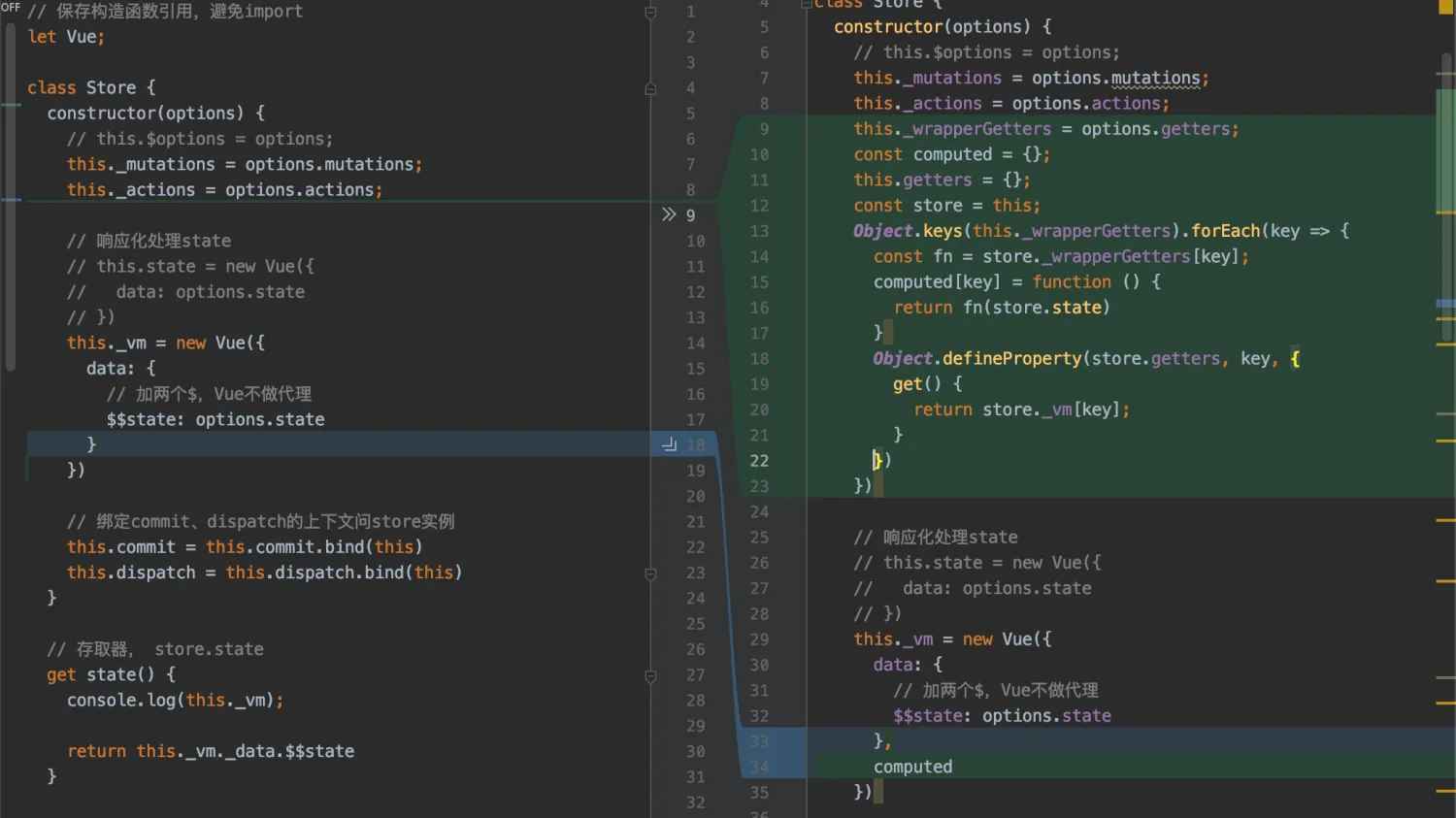
getters实现
Vue指令API
- 指令的组成公式
v-directionName.modify:arg="expression" - 五个钩子方法
bind、inserted、update、componentsUpdated、unbind - 可以简写相当于
bind和update两个方法的合并 - 钩子函数的四个参数
el、binding、vnode、oldVnode binding参数name、modify、arg、expression、value、oldValue
指令与组件的区别
- 组件和指令都是vue实现逻辑复用的方式
- 组件用于构建独立的模块
- 指令用于处理普通元素涉及底层访问的DOM操作相关逻辑
mint-ui的infintite-scroll执行实现
- 使用Vue指令方式实现,参数有距离底部阀值、是否禁用、是否立即检查,通过标签属性传递。
- 在
bind时候进行对dom添加scroll监听,unbind的时候移除监听 - 事件绑定有套检查机制,只有挂载到
dom节点上才添加监听,监听方法做了节流 - 立即检查为真时,会立即监听,如果
disable变为false也会立即添加监听
本文作者:郭敬文
本文链接:
版权声明:本博客所有文章除特别声明外,均采用 BY-NC-SA 许可协议。转载请注明出处!
目录